Because “who’s using my tokens?” is always a fun question—especially at chargeback time.
Disclaimer: The views and opinions expressed here are my own and do not necessarily reflect those of my employer or any organization with which I am affiliated.
Hello and welcome back! In my last post, I walked through how to use LLM logging with API Management (APIM) to track token usage across your deployed models—handy for reporting by product or subscription ID.
A question that popped up right away was: “Hey Scott, that’s awesome… but how do I track usage by an application’s client ID?”
Totally fair ask. Many orgs have multiple departments building their own apps that call the same Azure OpenAI deployments. Each app typically has its own Entra ID app registration (and therefore its own client ID) used to authenticate. So the business wants reports by app registration, not just by the APIM product/subscription key.
Yes, you can create separate APIM products per department and use product-based reporting for chargeback. But if you’ve got multiple apps sharing the same product (or you just don’t want product sprawl), you need another way to tell callers apart. That’s where the client ID earns its keep.
Step 1: Get the app’s client ID into your APIM logs
First hurdle: APIM (and the AI Gateway) don’t automatically log the calling app’s client ID in a nice, query-able (is that a word?) column. So we’ll add it ourselves. The easiest place to start is with a JWT validation policy in APIM.
If you’re doing Entra ID auth already, there’s a good chance you’ve got something like this in your <inbound> policy section. If not, here’s a sample snippet to get you rolling:
<validate-jwt header-name=”Authorization” failed-validation-httpcode=”401″ failed-validation-error-message=”Unauthorized. Access token is missing or invalid.”>
<openid-config url=”https://login.microsoftonline.com/{aad-tenant}/v2.0/.well-known/openid-configuration” />
<audiences>
<audience>{audience-value – (ex:api://guid)}</audience>
</audiences>
<issuers>
<issuer>{issuer-value – (ex: https://sts.windows.net/{tenant id}/)}</issuer>
</issuers>
<required-claims>
<claim name=”aud”>
<value>{backend-app-client-id}</value>
</claim>
</required-claims>
</validate-jwt>
In the <required-claims> section, you can list the client IDs of the apps you want to allow through the front door to access your APIs, so not just dependent on subscription keys.
At this point you might be thinking: “Cool—validated token, problem solved.” Not quite. Validation keeps out the riff-raff, but it doesn’t automatically log the caller’s client ID where we can report on it.
Step 2: Emit the client ID via trace
Next we’ll take the aud claim from the token (which, in this setup, maps to the calling app’s client ID), stash it in a variable named clientId, and then write it into the gateway logs using trace. Here’s what that looks like in your inbound policy:
<set-variable name=”clientId” value=”@( ((Jwt)context.Variables[\”jwt-token\”]).Claims.GetValueOrDefault(\”aud\”) )” />
<trace source=”audClaim” severity=”information”>
<message>@(“ClientID: ” + context.Variables[\”clientId\”])</message>
</trace>
Assuming you have APIM diagnostics/logging enabled on the API (see the previous post), you should now see that trace message landing in ApiManagementGatewayLogs. In other words: we’re officially logging the client ID. Here’s what it looks like in the TraceRecords field:

Now for the fun part: pulling that client ID out of the trace and rolling it up with your token utilization summary.
Step 3: Query tokens by ClientId (KQL)
ApiManagementGatewayLogs
| where TimeGenerated >= ago(60d)
// Parse TraceRecords to extract ClientId from message
| extend ParsedTraceRecords = parse_json(TraceRecords)
| extend TraceMessage = tostring(ParsedTraceRecords[0].message)
| extend ClientId = extract(@”ClientID:\\s*([a-fA-F0-9\\-]+)”, 1, TraceMessage)
| join kind=inner ApiManagementGatewayLlmLog on CorrelationId
| where SequenceNumber == 0 and IsRequestSuccess
| extend ParsedUrl = parse_url(BackendUrl)
| extend ExtractedEndpoint = strcat(ParsedUrl.Scheme, “://”, ParsedUrl.Host, “/”)
| extend DeploymentFromUrl = extract(“/openai/deployments/([^/]+)/”, 1, BackendUrl)
| summarize
TotalTokens = sum(TotalTokens),
CompletionTokens = sum(CompletionTokens),
PromptTokens = sum(PromptTokens),
FirstSeen = min(TimeGenerated),
LastSeen = max(TimeGenerated),
Regions = make_set(Region, 8),
CallerIpAddresses = make_set(CallerIpAddress, 8),
ProductIds = make_set(ProductId, 8),
Calls = count()
by ClientId, DeploymentFromUrl, ExtractedEndpoint, BackendId
| project
ClientId,
DeploymentName = DeploymentFromUrl,
BackendId,
Endpoint = ExtractedEndpoint,
PromptTokens,
CompletionTokens,
TotalTokens,
Calls,
FirstSeen,
LastSeen,
Regions,
CallerIpAddresses,
ProductIds
| order by ClientId asc, TotalTokens desc
And here’s a sample of what the output looks like:
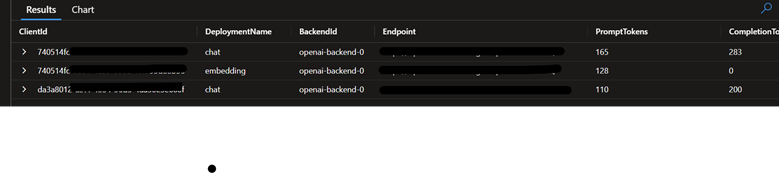
That’s it—you’ve now got token utilization per application client ID, per deployment. Much easier to explain in a finance meeting, and much harder for the mystery-token-goblins to hide.